4.4. Geometry Groups#
4.4.1. Group#
4.4.1.1. Overview#
A Group is a container for several geometry elements.
It provides the following functionality:
Functionality |
Example |
|---|---|
Adding and removing one or more elements: |
|
Emptying all elements: |
|
Check if an element is included: |
|
Move the entire group: |
|
Rotate or flip the whole group: |
|
Create a ray transfer matrix of the whole group: |
|
A Group object stores all elements in their own class lists:
lenses, ray_sources, detectors, markers, filters, apertures, volumes.
Here, IdealLens and Lens are included in the same lens list, marker types are included in markers
and all volume types in volumes.
When adding objects, the ordering of former objects inside the list remains the same.
Thus lenses[2] denotes the lens that was added third (counting starts at 0).
For clarity, it is recommended to add objects in their correct z-order along the optical axis.
4.4.1.2. Geometry properties#
A group shares many functions for geometry properties and manipulations with the Element classes,
see Shared Functions/Properties. There are three main differences:
Position
The position property describes the position of the first element (smallest z-position) in the group.
Flipping
When flipping, optional parameters y0, z0 define a rotation axis.
By default, y0 = 0 and z0 are the center of the extent of the group.
See Group.flip for more details.
Rotation
For rotation, parameters x0, y0 can be provided,
which also describe a position of the rotation axis.
They default to zero, see Group.rotate.
4.4.1.3. Example#
The following example creates a Group consisting of an IdealLens and
an Aperture.
IL = ot.IdealLens(r=6, D=-20, pos=[0, 0, 10])
F = ot.Aperture(ot.RingSurface(ri=0.5, r=10), pos=[0, 0, 30])

G = ot.Group([IL, F])
Next, we flip the group, reversing the z-order of the elements and flipping each element around its x-axis through the center. Since all elements are rotationally symmetric, this just reorders them. After flipping, we move the group to a new position. This position is the new position for the first element (which after flipping is the filter), whereas all relative distances between elements are kept equal.
G.flip()
G.move_to([0, 1, 0])
The filter is the first element and has the same position as we moved the group to.
>>> G.apertures[0].pos
array([0., 1., 0.])
The lens has the same relative distance of \(\Delta z = 20\) mm relative to the Filter, but in a different absolute position and now behind the filter.
>>> G.lenses[0].pos
array([ 0.,  1., 20.])
4.4.2. Loading ZEMAX OpticStudio Geometries (.zmx)#
optrace supports the import of basic .zmx geometries into the raytracer.
The following example loads a geometry from file setup.zmx:
RT = ot.Raytracer(outline=[-20, 20, -20, 20, -20, 200])

RS = ot.RaySource(ot.CircularSurface(r=0.05),
                  spectrum=ot.presets.light_spectrum.d65,
                  pos=[0, 0, -10])
RT.add(RS)

n_schott = ot.load_agf("schott.agf")
G = ot.load_zmx("setup.zmx", n_dict=n_schott)
RT.add(G)

RT.trace(10000)
For the materials to be loaded correctly, all required materials inside the .zmx
need to be included with the correct naming in the n_dict dictionary.
You can either load them from a .agf catalogue like in Section 4.6.4 or create the dictionary manually.
Exemplary .zmx files can be found in the following
repository.
Unfortunately, the support is only limited, as there is no official documentation on the file format. Additionally, only a subset of all ZEMAX OpticStudio functionality is supported, including:
sequential simulation (
SEQ-mode only)units in millimeters (
UNITmust beMM)only
STANDARDorEVENASPHsurfaces, this allows forRingSurface, CircularSurface, SphericalSurface, ConicSurface, AsphericSurfacein optraceno support for coatings
temperature or absorption behavior of the material is neglected
only loads lens and aperture geometries, no support for any additional objects
Some information on the file format are available in [1], as well as here and here.
4.4.3. Geometry Presets#
4.4.3.1. Ideal Camera#
An ideal camera preset provides aberration-free imaging towards a detector.
The preset is loaded with ot.presets.geometry.ideal_camera
and returns a Group object consisting of a lens and a detector.
Required parameters are the object position z_g , the camera position (the position of the lens)
cam_pos, and the image distance b,
which in this case is just the difference distance between lens and detector.
A visual presentation of these quantities is shown in the figure below.
An example call is:
G = ot.presets.geometry.ideal_camera(cam_pos=[1, -2.5, 12.3],
                                     z_g=-56.06, b=10)
Additional lens diameter parameter r and detector radius r_det parameters are available:
G = ot.presets.geometry.ideal_camera(cam_pos=[1, -2.5, 12.3],
                                     z_g=-56.06, b=10, r=5, r_det=8)
The function also supports an infinite position of z_g = -np.inf.
When given a desired object magnification \(m\), the image distance parameter \(b\) is calculated according to:
Here, \(g\) is the object distance, in our example z_g - cam_pos[2].
Note that \(b, g\) both need to be positive for this preset to work.
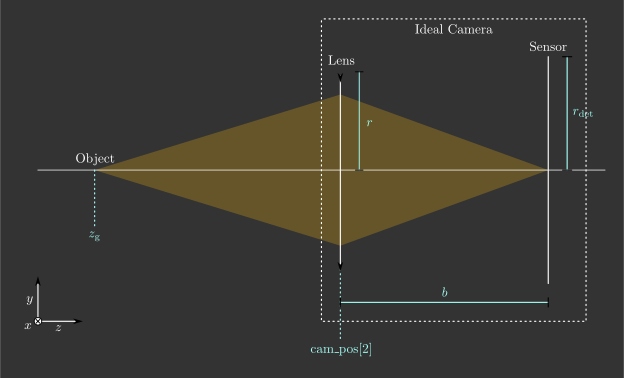
Fig. 4.17 Visualization of the ideal_camera parameters.#
4.4.3.2. LeGrand Paraxial Eye Model#
The LeGrand full theoretical eye is a simple eye model consisting of spherical surfaces only and wavelength-independent refractive indices. It models the paraxial behavior of a far-adapted eye.
Surface |
Radius in mm |
Conic Constant |
Refraction Index to next surface |
Thickness (mm) (to next surface) |
|---|---|---|---|---|
Cornea Anterior |
7.80 |
0 |
1.3771 |
0.5500 |
Cornea Posterior |
6.50 |
0 |
1.3374 |
3.0500 |
Lens Anterior |
10.20 |
0 |
1.4200 |
4.0000 |
Lens Posterior |
-6.00 |
0 |
1.3360 |
16.5966 |
Retina |
-13.40 |
0 |
- |
- |
The preset legrand_eye is located in
ot.presets.geometry.
The function returns a Group object that can be added to a Raytracer.
Provide a pos parameter to position it at any other location than [0, 0, 0].
RT = ot.Raytracer(outline=[-10, 10, -10, 10, -10, 60])
eye_model = ot.presets.geometry.legrand_eye(pos=[0.3, 0.7, 1.2])
RT.add(eye_model)
Optional parameters include a pupil diameter and a lateral detector (retina) radius, both given in millimeters.
eye_model = ot.presets.geometry.legrand_eye(pupil=3, r_det=10, pos=[0.3, 0.7, 1.2])
4.4.3.3. Arizona Eye Model#
A more advanced model is the arizona_eye model,
which tries to match clinical levels of aberration for different adaption levels.
It consists of conic surfaces, dispersive media and an adaptation dependent geometry.
Surface |
Radius in mm |
Conic Constant |
Refraction Index to Next Surface |
Abbe Number |
Thickness (mm) (to Next Surface) |
|---|---|---|---|---|---|
Cornea Anterior |
7.80 |
-0.25 |
1.377 |
57.1 |
0.55 |
Cornea Posterior |
6.50 |
-0.25 |
1.337 |
61.3 |
\(t_\text{aq}\) |
Lens Anterior |
\(R_\text{ant}\) |
\(K_\text{ant}\) |
\(n_\text{lens}\) |
51.9 |
\(t_\text{lens}\) |
Lens Posterior |
\(R_\text{post}\) |
\(K_\text{post}\) |
1.336 |
61.1 |
16.713 |
Retina |
-13.40 |
0 |
- |
- |
- |
With an accommodation level \(A\) in dpt, the parameters are calculated as: [2]
Accessing and adding the group works is handled the same way as for the
legrand_eye preset.
RT = ot.Raytracer(outline=[-10, 10, -10, 10, -10, 60])
eye_model = ot.presets.geometry.arizona_eye(pos=[0.3, 0.7, 1.2])
RT.add(eye_model)
As for the legrand_eye, the parameters
pupil and r_det are available.
There is an additional adaptation parameter, specified in diopters, which defaults to 0 dpt.
eye_model = ot.presets.geometry.arizona_eye(adaptation=1, pupil=3, r_det=10, pos=[0.3, 0.7, 1.2])
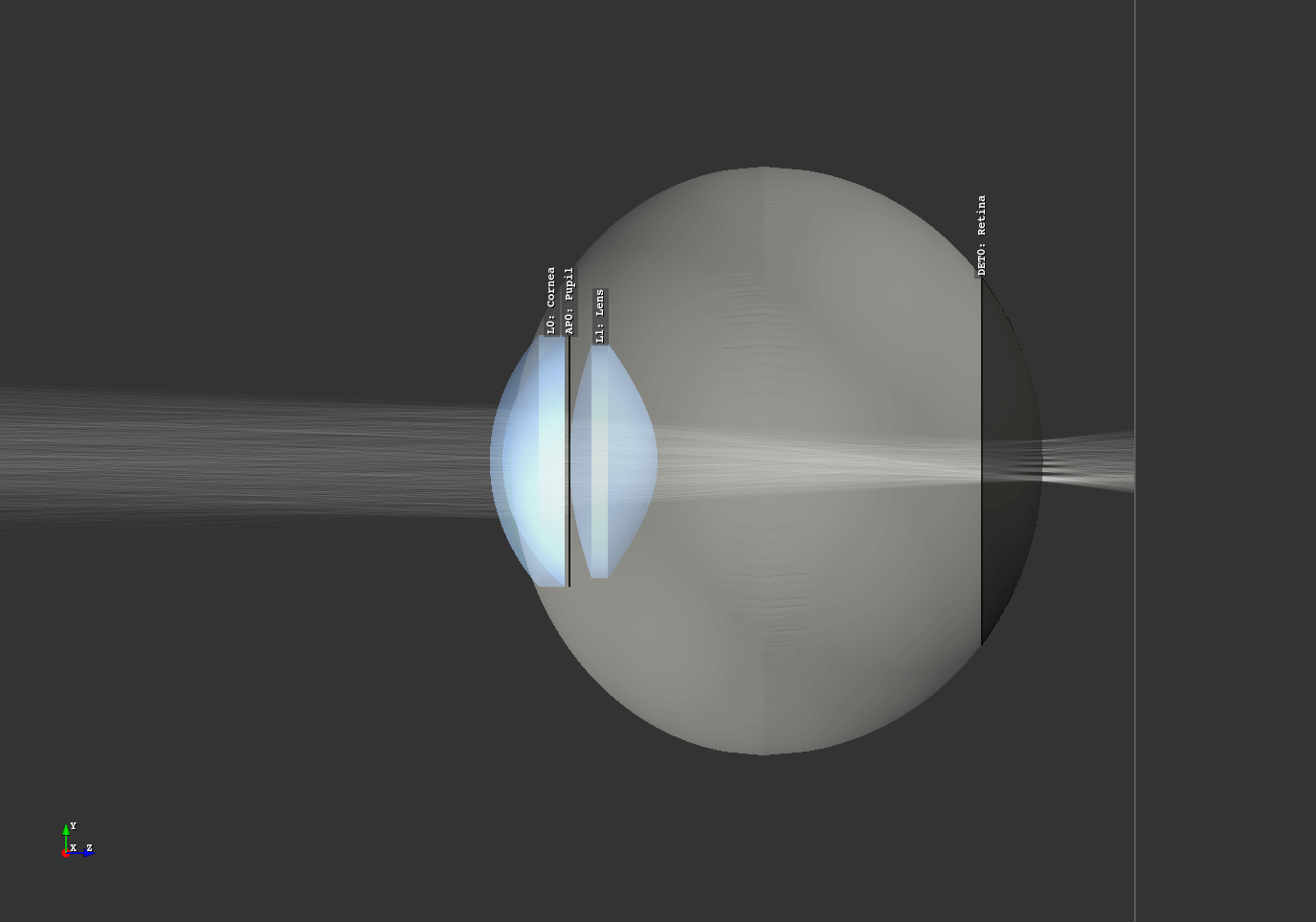
Fig. 4.18 Eye model in the Arizona Eye Model example script.#
References