4.8. Spectrum Classes#
4.8.1. LightSpectrum#
A LightSpectrum defines wavelength-dependent emittance of light, with all spectral power values being \(\geq 0\).
LightSpectrum objects are required for creating a RaySource
or result from rendering spectral distribution on sources or detectors.
4.8.1.1. Creating the Spectrum#
Units
For line spectra (modes "Monochromatic" and "Lines") the spectral unit is W,
while for all other modes the spectral power density is given as unit W/nm.
Distribution and shape parameters (val, line_vals, ...) are given in the same units.
For spectra defining a ray source, the absolute scaling is of no importance,
as the overall power is defined by the power parametrization of the RaySource.
Constant
The Constant mode defines a wavelength-independent spectrum with value val:
spec = ot.LightSpectrum("Constant", val=12.3)
Monochromatic
The Monochromatic mode defines a single wavelength source at wl with area (= power) val.
spec = ot.LightSpectrum("Monochromatic", wl=423.56, val=3)
Lines
A line spectrum consists of multiple monochromatic sources.
The argument lines is a list of wavelengths,
while line_vals is a list describing the height/power of each wavelength.
spec = ot.LightSpectrum("Lines", lines=[458, 523, 729.6], line_vals=[0.5, 0.2, 0.1])
Rectangle
The following equation defines a spectrum with a rectangular function with bounds wl0,
wl1 and a scaling factor val:
spec = ot.LightSpectrum("Rectangle", wl0=520, wl1=689, val=0.15)
Gaussian
A Gaussian spectrum is mathematically modelled with a scaling factor \(S_0\), a center wavelength \(\lambda_0\) and a standard deviation \(\sigma_\lambda\):
The LightSpectrum is then defined with mode "Gaussian", a mean value mu
and standard deviation sig, all given in nanometers.
Note that the Gaussian function is truncated to the visible range [380nm, 780nm].
spec = ot.LightSpectrum("Gaussian", mu=478, sig=23.5, val=0.89)
Blackbody Radiator
The spectral radiance of a blackbody radiator according to Planck’s Law is given as [1] :
This equation contains the speed of light \(c\), the Planck constant \(h\) and the Boltzmann constant \(k_\text{B}\):
Note that \(\lambda\) must be specified in meters in the above equation.
Note
The spectral radiance \(B_\lambda\) (Power per solid angle, source area and wavelength) is given in units \(\text{W}/(\text{m}^3~\text{sr})\), whereas the units in this class should be \(\text{W/nm}\) (power per wavelength). Since \(B_\lambda\) is assumed angle independent and constant over the source area, both quantities only differ by a constant scaling factor.
There is an option available to normalize the spectrum, so its peak equals one. This can prove useful for plotting the spectrum. If the peak wavelength is inside the visible range, then the Stefan–Boltzmann law can be applied to calculate the normalization factor. Otherwise the maximum value will lie at one of the edges of the visible range.
A blackbody radiator, following Planck’s law, with a specific temperature of T in Kelvin, is initialized as:
spec = ot.LightSpectrum("Blackbody", T=3890, val=2)
The val parameter defines the peak value in W/nm.
User Function/Data
With the Data/Function mode, the spectrum is modelled by a user function or a data set. For the latter, the data will be interpolated linearly.
This function requires a wavelength array in nm as input and returns a numpy array of the same shape.
spec = ot.LightSpectrum("Function", func=lambda wl: np.arctan(wl - 520)**2)
If a function with multiple parameters is utilized, additional arguments can be provided
in the func_args parameter dictionary.
spec = ot.LightSpectrum("Function", func=lambda wl, c: np.arctan(wl - c)**2, func_args=dict(c=489))
For discrete datasets, the "Data" mode is recommended.
In this case the LightSpectrum constructor takes a wavelength array wls
and a value array vals as arguments, where both must be of the exact same one-dimensional shape.
wls = np.linspace(450, 600, 100)
vals = np.cos(wls/500)

spec = ot.LightSpectrum("Data", wls=wls, vals=vals)
Note that wls needs to be monotonically increasing with the same step size
and needs to lie inside the visible range [380nm, 780nm].
Histogram
This spectrum mode consists of a list of bins and bin values. It is not defined by the user, but created when rendering spectra on a detector or source.
4.8.1.2. Calculating Spectral Values#
Calling the LightSpectrum with a wavelength array calculates its spectral values:
>>> wl = np.linspace(400, 500, 5)
>>> spec(wl)
array([0.        , 0.        , 0.62160997, 0.58168242, 0.54030231])
4.8.1.3. Wavelength Characteristics#
The following wavelength characteristics are available:
Function |
Unit |
Meaning |
|---|---|---|
nm |
wavelength for the spectral peak |
|
nm |
power-weighted average wavelength, see Centroid Wavelength |
|
nm |
full-width-at-half-maximum wavelength range |
|
nm |
same hue wavelength, see Dominant Wavelength
np.nan if not existent |
|
nm |
opposite hue wavelength, see Dominant Wavelength
np.nan if non-existent |
For instance, we can calculate the peak wavelength of the LED B1 standard illuminant with:
>>> spec = ot.presets.light_spectrum.led_b1
>>> spec.peak_wavelength()
605.00225...
Note that without a distinct maximum (due to multiple peaks, a plateau, …) the first peak position will be returned.
The centroid wavelength for the spectrum is:
>>> spec.centroid_wavelength()
592.39585...
The dominant wavelength is:
>>> spec.dominant_wavelength()
584.75088...
When dominant or complementary are non-existent (e.g. magenta can’t be described by a wavelength), the values are set to NaN (not a number). You can find a visualization on both dominant and complementary wavelengths on this Wikipedia page.
The FWHM (full width at half maximum) is computed in the following way:
>>> spec.fwhm()
129.18529...
The method calculates the smallest FWHM around the highest peak. While it is possible to calculate this value for all spectral shapes, it is only meaningful as width characterization for functions with a distinctive peak and an outward fall-off.
4.8.1.4. Power#
The total spectral power can be calculated with:
>>> spec.power()
3206.9749...
And the luminous power in lumen units with:
>>> spec.luminous_power()
999886.86...
4.8.1.5. Rendering a LightSpectrum#
Read section Rendering a RenderImage for details on rendering images.
Rendering spectra is done in a similar way.
Analogously to rendering a source image, we can render a spectrum with
source_spectrum
and by providing a source_index parameter (the default is zero).
With a raytracer object RT, a source spectrum from source 1 is rendered with:
spec = RT.source_spectrum(source_index=1)
For a detector spectrum the detector_spectrum
function is applied.
It takes a detector_index argument, that defaults to zero.
spec = RT.detector_spectrum(detector_index=0)
Additionally, only light from a specific source is examined by providing a source_index.
The detector area is limited by the extent parameter, as was already the case for
the detector_image method.
spec = RT.detector_spectrum(detector_index=0, source_index=1, extent=[0, 1, 0, 1])
The above methods return a LightSpectrum
object with type spectrum_type="Histogram".
4.8.2. TransmissionSpectrum#
The Filter class requires a TransmissionSpectrum definition.
These relative transmission values all lie inside the [0, 1] range.
The TransmissionSpectrum provides less modes than the LightSpectrum class.
But compared to the latter, the scaling factor vall now becomes important.
This class defines a new inverse parameter, that subtracts the defined function from a value of one.
This has the effect of turning the transmittance behavior into absorptance.
A Gaussian bandpass becomes a notch filter, a rectangular bandpass a rectangular blocking filter.
Constant
A neutral density filter is defined with mode "Constant" and the linear transmittance value.
spec = ot.TransmissionSpectrum("Constant", val=0.5)
Gaussian
Colored filters (most commonly bandpass filters) can be created with a Gaussian function.
spec = ot.TransmissionSpectrum("Gaussian", mu=550, sig=30, val=1)
A Gaussian notch filter is easily defined with parameter inverse=True.
spec = ot.TransmissionSpectrum("Gaussian", mu=550, sig=30, val=1, inverse=True)
Rectangle
A rectangular pass filter is modelled by a rectangular function.
spec = ot.TransmissionSpectrum("Rectangle", wl0=500, wl1=650, val=0.1)
A rectangular blocking filter can be defined with inverse=True.
spec = ot.TransmissionSpectrum("Rectangle", wl0=500, wl1=650, inverse=True)
Creating an edgepass filter is done by setting one rectangle bound to the edge of the visible range.
spec = ot.TransmissionSpectrum("Rectangle", wl0=500, wl1=780)
User Data/Function
Creating a TransmissionSpectrum with discrete data is done equivalently to a LightSpectrum.
However, all function/data values need to be inside the range [0, 1].
Getting Spectral Values
As for the LightSpectrum object, a call returns the spectral values:
>>> wl = np.linspace(400, 550, 5)
>>> spec(wl)
array([0., 0., 0., 1., 1.])
4.8.3. Spectrum#
Spectrum is the parent class of both LightSpectrum and TransmissionSpectrum.
It defines the following modes:
"Monochromatic", "Rectangle", "List", "Function", "Data", "Gaussian", "Constant".
Compared to LightSpectrum, only modes "Histogram" and "Blackbody" are missing.
Generally, the Spectrum class is not exposed to the user.
But, for instance, the color matching functions
ot.presets.spectrum.x, ot.presets.spectrum.y, ot.presets.spectrum.z are objects of this type.
4.8.4. Plotting#
See Spectrum Plotting.
4.8.5. Spectral Lines Presets#
optrace provides some spectral wavelength lines in its presets.
Name |
Wavelength
in nm
|
Element |
Color |
|---|---|---|---|
h |
404.6561 |
Hg |
violet |
g |
435.8343 |
Hg |
blue |
F’ |
479.9914 |
Cd |
blue |
F |
486.1327 |
H |
blue |
e |
546.0740 |
Hg |
green |
d |
587.5618 |
He |
yellow |
D |
589.2938 |
Na |
yellow |
C’ |
643.8469 |
Cd |
red |
C |
656.272 |
H |
red |
r |
706.5188 |
He |
red |
A’ |
768.2 |
K |
IR-A |
Due to limitations in python variable names, presets with a trailing apostrophe are named with an trailing underscore.
For instance, F’ becomes F_.
>>> ot.presets.spectral_lines.F_
479.9914
The most common wavelength combinations for Abbe numbers are FdC, FDC, FeC and F’eC’.
>>> ot.presets.spectral_lines.F_eC_
[479.9914, 546.074, 643.8469]
The following table provides the dominant wavelengths of the sRGB primaries (ITU-R BT.709). Dimensioning the scaling factors in the provided way produces D65 sRGB-white for equal R, G, B mixing ratios.
Name |
Wavelength
in nm
|
Scaling Factor |
|---|---|---|
R |
611.2826 |
0.5745000 |
G |
549.1321 |
0.5985758 |
B |
464.3118 |
0.3895581 |
These wavelengths are useful for simulating color mixing.
>>> ot.presets.spectral_lines.rgb
[464.3118, 549.1321, 611.2826]
4.8.6. Spectrum Presets#
The following figures demonstrate the predefined presets for Spectrum and LightSpectrum.
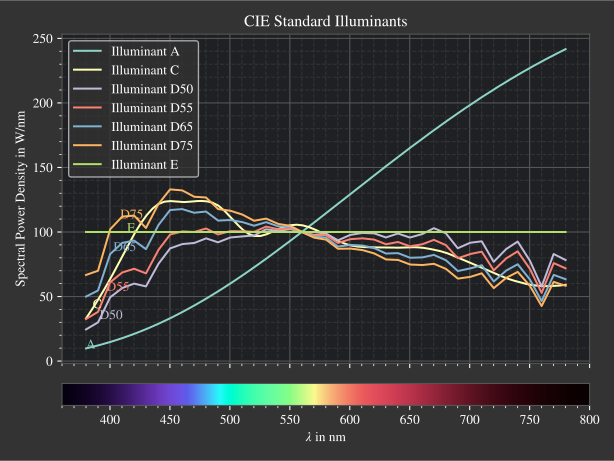
Fig. 4.51 CIE standard illuminants. Available as
|
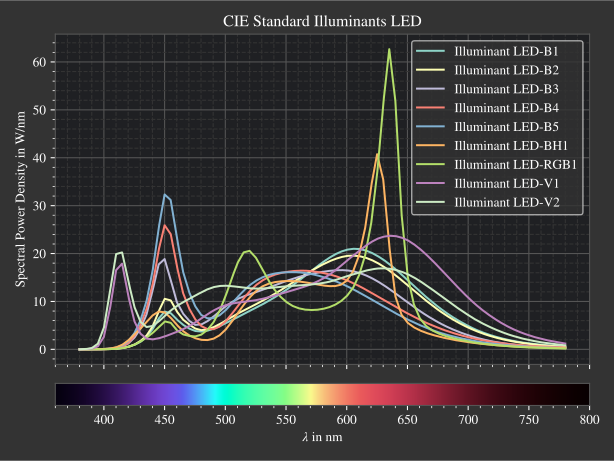
Fig. 4.52 CIE standard illuminants LED series. Available as
|
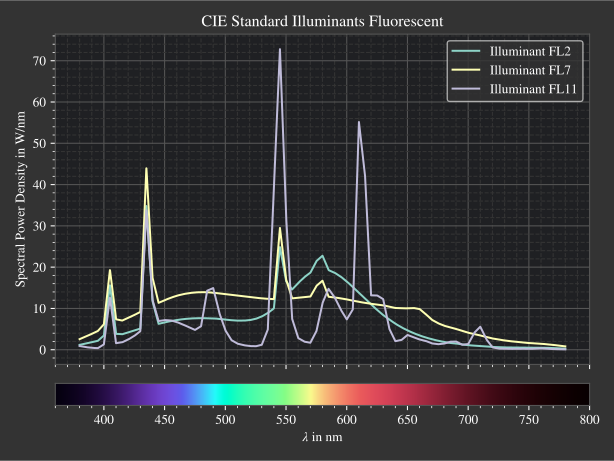
Fig. 4.53 CIE standard illuminants Fluorescent series. Available as
|
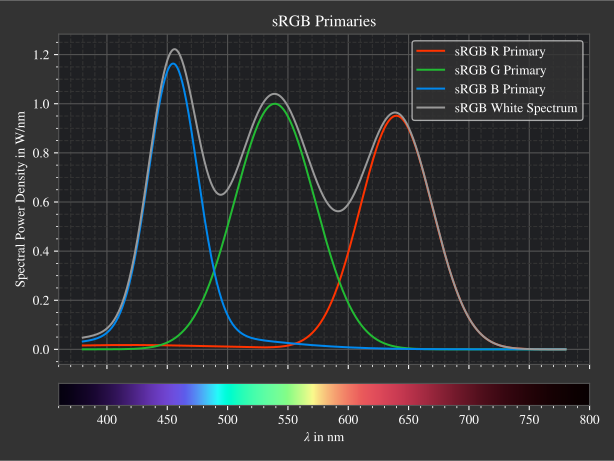
Fig. 4.54 Possible sRGB primary spectra.
Available as |
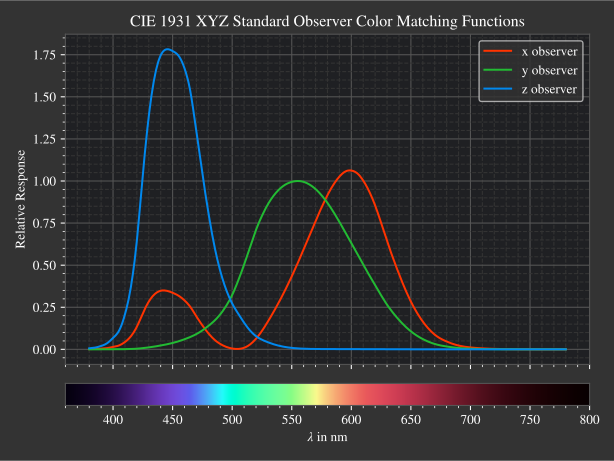
Fig. 4.55 CIE color matching functions.
Available as |
Other presets include spectra from spectral lines combination in Section 4.8.5.
Namely ot.presets.light_spectrum.<name> with FdC, FDC, FeC, F_eC_, rgb as <name>.
References